 Why we're using electronic payslips
Electronic payslips provide a faster, more secure and convenient way to receive your pay information.
They also support a more efficient, sustainable payroll process.
Paper payslips are no longer issued, and all employees will now receive their payslip electronically.
Receiving your payslip
You'll need to submit a personal email address so you can receive your payslip electronically.
We advise using a personal email address because it ensures you can always access your payslip, even if you change roles, schools, or leave your employment. Work email addresses may also have filters or restrictions that can block secure delivery.
You will receive your electronic payslip each month in line with the normal payroll schedule.
How to submit a personal email address
We're using a secure platform called 'My Derbyshire' to collect and verify personal email addresses.
If you already have a My Derbyshire account, log in. If you don't, you'll need to register for one.
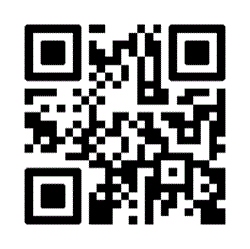
Scan the QR code on this page or visit My Derbyshire and follow the steps to register. You'll receive an email to verify your account – make sure you verify this by clicking the link in the email.
- Complete your user profile with:
- basic details – first and last name
- address details – street and postcode
- all other fields are optional
- Complete the form with your National Insurance (NI) number and employee number - your employee number can be found at the top of your payslip, beneath your name and address
- If the form doesn't appear immediately, click the link again – My Derbyshire will keep you signed in and take you straight to the form
This ensures your email address is correct and securely linked to your NI number for safe payslip delivery.
How to find your NI number
Check your P60 or find your National Insurance number online.
Tips for a smooth experience
- Use an email address that is easily accessed
- Please only submit an email address once by selecting one personal email address
- Check your email settings to make sure your email provider supports encrypted emails
- Download your email provider's app (for example, Gmail or Outlook) onto your phone
- If you're using a one-time passcode, allow time for it to arrive
- Open attachments using your default browser
- If it doesn't work first time, try again or use a different browser/app
Key dates
- Submit your personal emails by: 31 March 2026
- First emailed payslips arrive: April 2026
What to do if you don’t receive your payslip
Make sure to check your spam or junk folder first. If you still can't find it, contact HR Services for support (their contact details follow).
Security and data protection
Payslips are sent using secure delivery methods and are protected so that only you can access them.
Your information is collected and processed in line with data protection legislation.
Electronic payslips are encrypted to protect your personal and financial information.
Changing or updating your email address
If you change your personal email address, you must update your details as soon as possible. This can be done by contacting your manager and asking them to email the relevant department shown as follows.
Support and contact
If you’re not confident or unsure how to access your payslip, you can ask a colleague, School Business Manager or line manager for help. You may also find it useful to ask someone with IT or digital experience to support you
Support is available, and it’s fine to ask for help.
If you have questions or need help with electronic payslips, you can contact: